Stats
Golf stats and a handicap that follows the rules
Putts, fairways, greens and scrambling from the scores you already keep. See where the shots go, how you play each course and where your handicap is heading.
Get Chalk for iPhone ↗- 31.4
- Putts / rd
- 52%
- Fairways
- 33%
- Greens
- 28%
- Scrambling
What the Stats tab shows
- Scoring
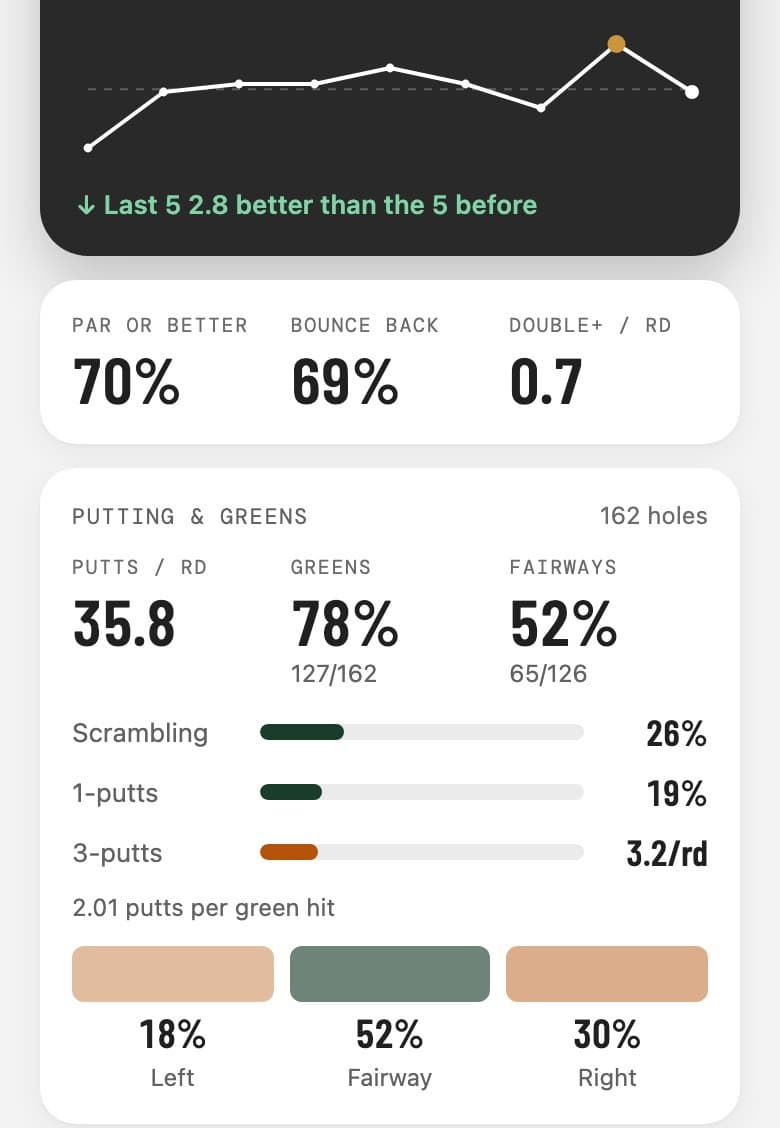
- Scoring average and trend, your best round, par or better, bounce back and doubles per round
- Putting & greens
- Putts per round, greens in regulation, scrambling, one-putts and three-putts
- Off the tee
- Fairways hit, and whether the misses go left or right
- By par
- How many over par you are on average on par 3s, 4s and 5s
- Where shots go
- Front nine against back nine, and the hardest holes against the easiest by stroke index
- Each course
- Every course you've played, as a list or on a map, with your stats for each hole
- Strokes gained
- Off the tee, approach, around the green and putting against the tour baseline, from marked shots
- Your bag
- The distance you really hit each club, from marked shots and voice notes
Pick the last five, ten or twenty rounds, or the whole season, and every number follows. Rounds with voice notes also show your shot pattern.
Putts and fairways, by tap or by voice
Swipe up on the score bar and the hole sheet has your score, putts from 0 to 4 and the tee shot: left, fairway or right. It closes itself once the hole is filled in. On par 3s there's no fairway to ask about.
In voice mode, say it the way you'd tell it: “driver right, chipped on, one putt for par.” Chalk logs the score, the putts and the miss. On the Apple Watch, the Digital Crown score sheet has putts and fairway too.
A handicap estimate that follows WHS
Chalk replays your rounds in date order the way the World Handicap System does: the best 8 of your last 20 score differentials, net double bogey at the index you held on the day, nine-hole and part rounds topped up with an expected score, exceptional score reductions, the soft and hard caps against your 12-month low, and the 54.0 maximum.
If you import your England Golf record or your GHIN scores, Chalk uses their own differentials for those cards, so the day's PCC is already counted, and shows your official index beside the estimate. It's an estimate, not your official index; that still comes from your club.
Strokes gained and your real club distances
Tap Mark at your ball before each shot and Chalk keeps the lie, the distance and the club. From those marks it works out strokes gained in four categories against the tour baseline, with your weakest area in bold, and the distance you really hit each club.
Strokes gained needs Pro and only counts holes where every stroke before the putts was marked. Your bag is free, and the numbers you type in win. See shot tracking and the strokes gained calculator.
Round analysis in ChatGPT or Claude
Connect Chalk Golf to ChatGPT or Claudeand ask about your stats in plain English: which holes cost you most, where your driver misses, whether your putting is getting better. Answers come from your own rounds. It's free, and it can log a round you forgot to record once you approve it.
Questions
How do I record putts and fairways?
Swipe up on the score bar during a round, or tap your score, and pick the putts and where the tee shot finished. Or say it in voice mode, and Chalk picks up the putts and the tee shot along with the score.
Is Chalk's handicap estimate my official Handicap Index?
No. Your official Handicap Index comes from your club and national association. Chalk's estimate follows the same WHS rules so you can see where your index is heading, and for cards imported from England Golf or GHIN it uses their own differentials.
Do old rounds count?
Yes. Rounds you scored before you started tracking putts still count towards scoring, by par and nines, and rounds you add by hand or import from England Golf or GHIN count too.
Do I need sensors or tags on my clubs?
No. Everything comes from the scores you enter by tap or voice, so there's nothing to charge or pair.