How to add a shot tracer to a golf video
By Chalk Golf ·
A shot tracer is the line that follows the ball across the sky on televised golf. You can put one on your own videos in two ways: let software find the ball and draw the line for you, or draw it yourself in a video editor. Both start with the same thing, which is a clip the ball can be found in.
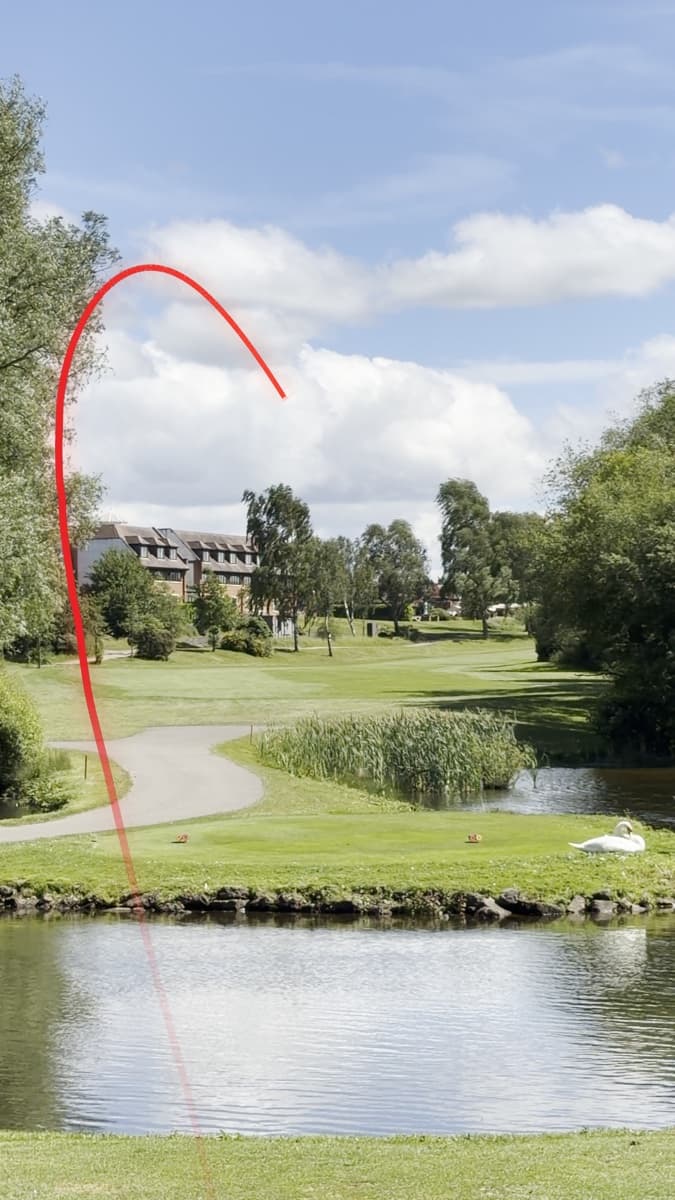
Film a clip that can be traced
Most bad tracers are bad clips. Before you think about software:
- Stand behind the golfer, on the target line. This is the classic down-the-line view, and it shows the whole flight from start to finish.
- Get the sky in. The ball is easiest to see against open sky. Frame the shot with the golfer low and plenty of sky above.
- Use a tripod, or brace the phone. A still camera makes the ball the only thing moving.
- Leave the sound on. Automatic tracers listen for the strike to find the moment of impact.
- Film in 4K or at 60 frames a second if you can. The ball moves a long way between frames at 30, and a sharper picture keeps it visible for longer.
- Keep filming until the ball lands. If you stop early, the end of the line has to be guessed.
The quick way: let software trace it
A shot tracer app finds the ball, follows it and draws the line, so a clip takes seconds instead of a session in an editor.
On an iPhone, Ball Tracer in the Chalk app traces a clip you've just filmed or one from your library. On a Mac, Chalk Tracer does the same for whole folders of clips and gives you more control over the result:
- Drop the clips in. Each one is traced in the background. Chalk Tracer hears the strike, finds the ball at impact and follows it, even if the camera moved to follow the ball.
- Check the line. Shots it's sure of are marked as tracked with confidence. If the ball was lost against cloud, click it in a frame or click where it landed and the shot is traced again. You can also drag the line by hand and set the curve and height.
- Style and export. Pick a look, add carry and apex if you want them, and export in 9:16 for TikTok, Reels and Shorts, 16:9 for YouTube, or 1:1 or 4:5 for Instagram.
The manual way: draw it in a video editor
Every editor follows the same method:
- Find the frame where the ball is struck.
- Step forward a frame at a time and mark where the ball is. Further out, when the ball is too small to see, estimate the path from where it was heading and where it lands.
- Draw a smooth path through those points.
- Reveal the path over time so the end of the line stays with the ball. The ball slows as it climbs, so the line should grow more slowly near the top.
- Add a glow, and if the golfer is in the way, mask them so the line passes behind them.
Step 2 is where the time goes, and it's the part tracer software does for you. How the rest works depends on the editor.
After Effects
Draw the flight with the Pen tool as a shape layer with a stroke and no fill. Add Trim Paths to the shape and keyframe its End from 0% at impact to 100% when the ball lands, then adjust the keyframes so the line keeps pace with the ball. A Glow effect finishes it. This is the most flexible of the manual methods.
Premiere Pro
Premiere Pro has no direct equivalent of Trim Paths. Most editors build the tracer in After Effects and bring it into the Premiere timeline with Dynamic Link. The alternative is to draw the line as a graphic and reveal it with a keyframed mask, which is harder to keep on a curved flight.
Final Cut Pro
Final Cut Pro can't animate a line being drawn on its own. Build the tracer in Apple Motion with a shape and the Write On behaviour, then publish it to Final Cut as a title or effect. There are also third-party tracer plugins for Final Cut.
DaVinci Resolve
Use the Fusion page. Draw the flight as a polyline stroke in a Paint node over the clip and animate its write-on so the line grows with the ball. Track the golfer with a mask if the line needs to go behind them.
CapCut
CapCut doesn't find the ball for you. A tracer there is built from a drawn line and keyframes, or from a template someone else has made, and it's fiddly to keep on a curved flight. For more than the odd clip, a dedicated tracer is quicker.
Which way to choose
Drawing a tracer by hand gives you full control over every frame, and if you already edit in After Effects it may be the way you prefer for a single hero shot. For more than a few shots, or when you post regularly, automatic tracing saves hours. You still get to adjust the line when you need to.
Making it look right
- Start the line at the ball, not the club. A line that starts at the clubhead looks wrong to golfers straight away.
- Keep the line with the ball. The line shouldn't run ahead of the ball or lag behind it.
- Pass behind the golfer. On a down-the-line shot the ball leaves from in front of the golfer, so the line should disappear behind their body as it rises.
- Choose a colour that stands out. Red reads well against blue sky. White or pale blue suits dark trees and overcast days.
- Label estimates as estimates. Carry and apex measured from a video are approximations. If you hit the shot on a launch monitor, use its numbers.